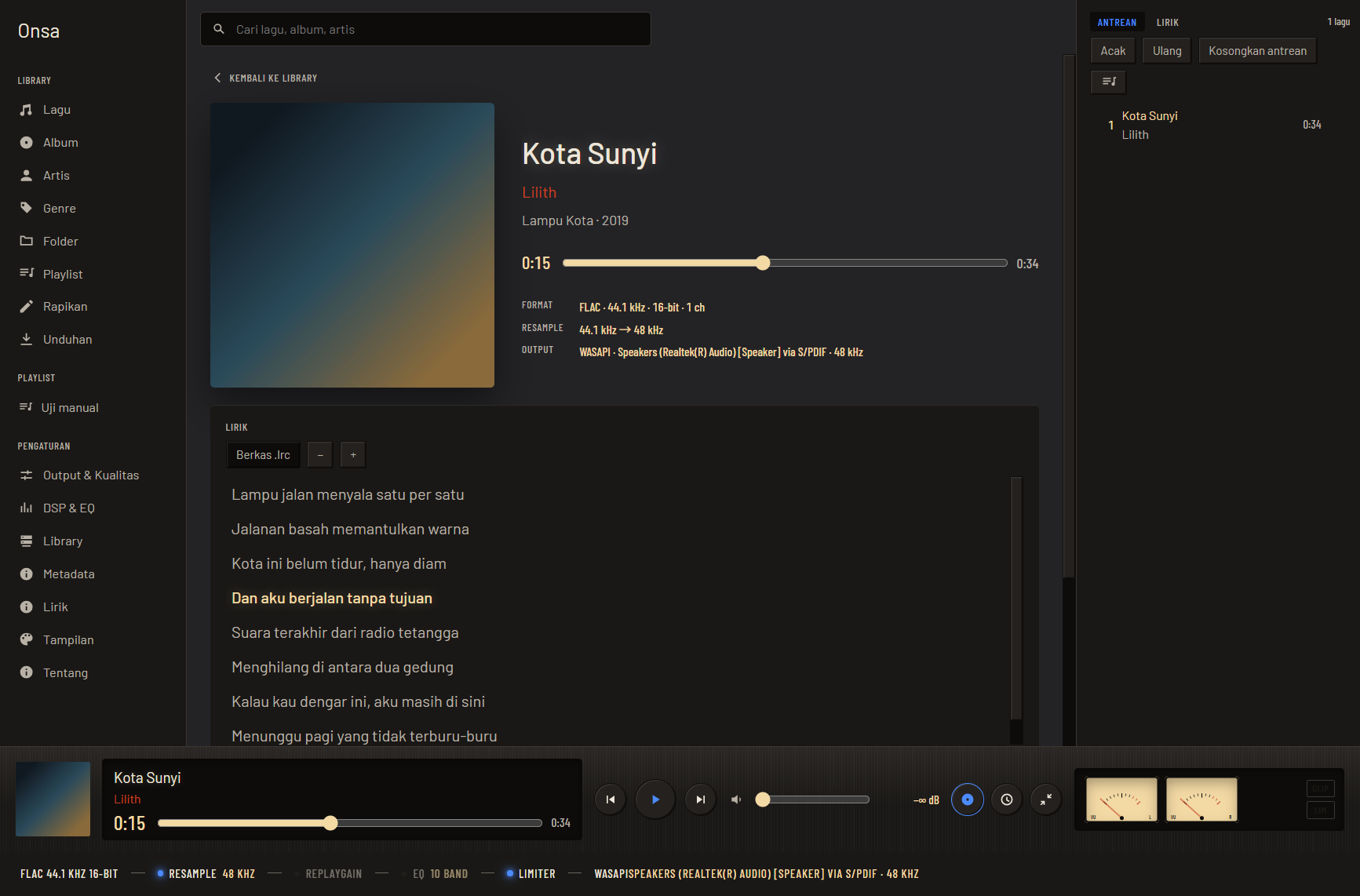
What it is
Onsa (音叉, tuning fork) is a desktop music player for Windows and Linux. It is aimed at people who keep their own music files and want to know what actually happens to their sound. Its visual identity is an instrument panel: the app looks like an honest measuring device, and the signal path strip at the bottom of the window shows every stage the sound really goes through — source format, resample, ReplayGain, EQ, limiter, all the way to the output backend. Each stage can be switched off from that strip.
Nothing contacts the internet unless you turn it on yourself. All network features are off by default.
What is in v1.4.0: gapless playback and crossfade, a reorderable queue, manual and smart playlists, a visible DSP chain, a library with full-text search and source folders that can be detached or moved, single and bulk tag editors, lyrics from three sources, a Now Playing screen with adjustable panels, six built-in themes, in-app help, and two interface languages. Downloads through yt-dlp now run several at a time, and the programs it needs — yt-dlp, ffmpeg, Deno, fpcalc — are fetched by Onsa itself, only after you approve and only once they match the checksums of their official releases.
The installers are on the
v1.4.0 release page,
built and uploaded by CI: Onsa_1.4.0_x64-setup.exe (11.79 MB) for Windows,
plus a .deb (18.93 MB) and an AppImage (89.92 MB) for Linux — Onsa’s first
Linux packages. The Linux packages have only been tried in WSL, not yet on a
real Linux machine.
Onsa’s code can be read on GitHub. The repo deliberately has no license yet; the licensing decision is on hold.
Next
v1.4.1 closes what remains of M10b: a download queue that survives closing Onsa, and a choosable folder for downloads. The code is already in the repo, but the release is not tagged yet.
Then M16 (v1.5 “Display”): a complete overhaul of the six built-in themes, each with its own layout. The opening theme is a vintage analog aircraft cockpit. The concepts for all six themes are approved; the theme schema is being extended beyond color — typefaces, surface materials, frames, meter and visualizer styles, and animation.
The screenshots on this page still show the old look; they will be replaced after M16 is released.
The audio engine is fully separate from the interface
The main principle of the architecture: the audio engine runs on its own thread and knows nothing about the interface. The interface is just a remote control that talks through Tauri commands and events. However heavy the interface gets, playback must never stutter.
The work is split across six Rust crates whose boundaries are guarded:
| Crate | Contents |
|---|---|
onsa-audio | Sources, resample, crossfade, DSP, output, analysis taps |
onsa-library | SQLite, scanner, folder watcher, tags, covers, playlists, search |
onsa-downloader | Binary manager and download runner |
onsa-lyrics | LRC parser, lyric sources, cache |
onsa-scrobble | Last.fm and an offline queue — waiting for M9 |
onsa-cli | Runs the audio engine without an interface |
The rule: onsa-audio depends on no other Onsa crate, and feature modules
don’t depend on each other. They only come together in src-tauri. The
downloader, for example, knows nothing about the library — it returns the
path of the resulting file, and src-tauri hands it over.
The direction of communication is fixed too: commands from the interface to
the backend (play, seek, set_eq, library_query), events from the
backend to the interface (playback position ≤ 10 Hz, analysis frames ≤ 60 Hz,
progress, errors). Cover art is served through a custom protocol, not as
base64 inside events.
Decisions locked before code was written
The specification was written first, before the first line of code. Some decisions are marked locked — not to be changed without the project owner’s approval:
| Area | Decision |
|---|---|
| Platform | Windows 10/11 and Linux x86_64. macOS is not targeted, but nothing is used on purpose that would make porting impossible. |
| Shell | Tauri 2 |
| Backend | Stable Rust, a Cargo workspace with a separate crate per module |
| Frontend | SvelteKit (Svelte 5, strict TypeScript), adapter-static, SPA |
| Styling | Plain CSS + CSS variables from the theme system. No Tailwind, no component library. |
| Database | SQLite via rusqlite, versioned migrations |
| Audio | symphonia, rubato, cpal, rtrb, realfft |
| HTTP | One reqwest client for the whole project, with timeouts, size limits, and failures returned as values |
Design decisions, with their reasons
Every decision that isn’t obvious from the code is recorded with a date, context, the decision, and the reason. A few that shaped the app:
- The control thread and the decode thread are merged. The specification drew them separately; what was built is one engine thread that processes commands between buffer fills. The reason: it is the simplest option and needs no locks between threads — while paused, the thread sleeps on the command channel, so idle CPU is zero.
- Gapless with resampling uses a single lane. Consecutive tracks with the same sample rate are joined inside one lane that uses one resampler, so the resampler sees a continuous signal. A seek, a skip, or a sample rate change starts a new lane.
- Pause and seek use a 60 ms micro-fade in the output callback, while skipping during playback uses a crossfade inside the stream. Pause feels instant, and skips still get the crossfade the specification asks for.
- Tag edits go into
overridesfirst; “write to file” is a separate action. Three layers — save in Onsa, write to the file, move the file — and undo walks down the same ladder. The most-used layer is the cheapest to undo. - Tag writes are read back before replacing the original file. A temporary copy is written and read back; if its contents don’t match, the copy is thrown away and the original file is never touched. This is not theoretical caution: lofty lost ID3v2 tags inside WAV files on the second write in a row.
- What is near gets reread, what is far gets remembered. A
.lrcfile next to the track and lyrics inside the tags are read every time the track changes; only answers from the internet are cached. Reading a small text file is cheaper than deciding whether what was remembered is still right. - “There are no lyrics” is remembered, but an unreachable service is not an answer. Swallowing the HTTP status would make a service that is down indistinguishable from one that says it doesn’t know — and a track could be recorded as having no lyrics because of one bad minute of network.
- Binary release sources are written in the code, not taken from what was downloaded. The URL, the file name in the checksum list, and its expected size are fixed. The checksum is fetched first, then the file; anything that doesn’t match is written nowhere, not even to look at.
Rules that must not be broken
In the cpal output callback and the DSP hot path: no memory allocation, locks, I/O, logging, or panics. Parameters come in through atomics or lock-free ring buffers and are applied with smoothing. All buffers are allocated up front. When in doubt about whether something is real-time safe, assume it isn’t and move it to another thread.
Safeguards that apply before anything touches someone’s files:
- Undo works per batch, not per step; each step is recorded with its before and after values, and undo runs backwards from the last step.
- Folder scope is tested against normalized paths, so
salinan/../asli/lagu.mp3cannot sneak through and a neighboring folder with a similar name is not part of the scope. - A limit of 50 files per run, with a hard ceiling of 500 — what decides it is not what the machine can handle but what a person can reread and undo if something goes wrong.
- Suggestions with confidence below 0.85 are still shown to read, but none of their fields are checked.
- Renaming always has a dry run that names the origin, the destination, and why a file cannot be moved.
Testing
There are no copyrighted music files in the repo. Audio fixtures are generated while the tests run — sines, sweeps, noise, and silence — along with tags the tests write themselves. The audio engine is tested through an offline sink: two files cut from one continuous sine are played in sequence and compared with the whole sine, and there must be no discontinuity. Biquad responses are checked at several test frequencies with a ±0.1 dB tolerance.
The number of test functions in the source tree at tag v1.4.0, counted from
#[test] and #[tokio::test] markers:
| Part | Test functions |
|---|---|
src-tauri | 126 |
onsa-library | 112 |
onsa-audio | 82 |
onsa-downloader | 58 |
onsa-lyrics | 36 |
onsa-cli | 2 |
onsa-scrobble | 0 — waiting for M9 |
| Rust, total | 416 |
Frontend (node --test) | 49 |
These are the number of test functions in the source, not the result of a
single run. CI runs cargo fmt --check, cargo clippy -- -D warnings,
cargo test, svelte-check, and an app build on a Windows and Ubuntu
matrix.
Beyond automated tests, each milestone has its own manual verification notes
in docs/PROGRESS.md — for M8, for example, 43 checks from commands, 22 from
the window, 6 at the smallest window size, and 8 specifically for the
completion criteria.
Milestones and their status
| Milestone | Status |
|---|---|
| M0 Project skeleton | Done 11 Sep |
| M1 Core audio engine | Done 11 Sep |
| M2 DSP chain | Done 11 Sep |
| M3 Library | Done 11 Sep |
| M4 Basic UI and OS integration | Done 12 Sep |
| M5 Visualizer, meters, tone colors | Done 13 Sep |
| M6 Playlists | Done 13 Sep |
| M7a Metadata | Done 18 Sep |
| M10a Binary fetcher and yt-dlp | Done 18 Sep |
| M8 Lyrics and single tag editor | Done 19 Sep |
| v1.0.0 — M0–M8 and M10a | Tagged 19 Sep 2026 — 533a2b0 |
| v1.0.1 — six fixes from an audit session | Tagged 19 Sep 2026 — c21e923 |
| v1.1.0 — in-app help | Tagged 20 Sep 2026 — 4af6879 |
| v1.2.0 — tester package, Windows installer from CI | Tagged 21 Sep 2026 — 26132f9 |
| M13 Source folder management | Done 27 Sep |
| M14 Now Playing panels | Done 27 Sep |
| v1.3.0 “Tidy” — M13, M14, four bugs from testing, tone colors in all six themes | Tagged 27 Sep 2026 — d51afdd |
| M10b ffmpeg, Deno, fpcalc, parallel downloads | Partly 29 Sep — the rest in v1.4.1 |
| M15 Download source list in Help | Done 29 Sep |
| v1.4.0 “Full downloads” — M10b, M15, Linux packages from CI | Tagged 9 Oct 2026 — 27aefb8 |
| v1.4.1 Rest of M10b | In progress, not tagged yet |
| M16 Display (v1.5) — six new themes, concepts approved 10 Oct | Next, after v1.4.1 |
| M17, M7b (v1.6) · M11, M18 (v1.7) | Planned |
| M9 Scrobble | Skipped, no date yet |
The order was changed once: after M7a came part of M10, then M8, and M9 was skipped. The reason, and the debt it created, are recorded. After M8 no new features went into v1, and v1.0.0 was tagged after the release binaries for both systems were run from a completely fresh state.
The three releases after that also had no new features. v1.0.1 fixed six findings from an audit session. v1.1.0 added in-app help, so someone opening Onsa for the first time can use it without asking its owner. v1.2.0 prepared a package for testers: every internet path was proven once against the real service, and the Windows installer is now built by CI — because building on the owner’s machine turned out to bake his personal AcoustID key into the binary.
New features came back from v1.3.0 and v1.4.0, both following the release line decided on 25 September. Tester reports are not a release gate; what comes in goes into the next patch release.
Known limits
Written as they are in the README and release notes, not hidden. For v1.4.0:
- ffmpeg and Deno are optional. Without ffmpeg, downloads still work, but the audio is taken as it is — no embedded tags or cover art, and conversion to MP3 or FLAC is not available. Without Deno, some YouTube formats may not be available. The Downloads page says both.
- The download queue is not saved yet. Unfinished downloads are lost if
Onsa is closed, and results always go into
Unduhanin the first library folder. Both are closed in v1.4.1. - Sources that only offer Opus are rejected with a message, because there is no Opus decoder yet. Better to reject up front than to let the file land and never show up in the library.
- No Last.fm scrobbling yet.
- Linux has only been tried in WSL, not yet on a real Linux machine.
- Word-level timing is already read and stored, but not yet drawn word by word — the line lights up, not the word.
- There is no final icon yet, and the project license is deliberately on hold.